Samson Q3 Spezifikationen Seite 5
- Seite / 14
- Inhaltsverzeichnis
- LESEZEICHEN

- Recorder 1
- Set the date and time 2
- Set the battery type 2
- Reduce noise 3
- Set the sound quality 3
- Format an SD card 4
- Turn operation sounds on/off 4
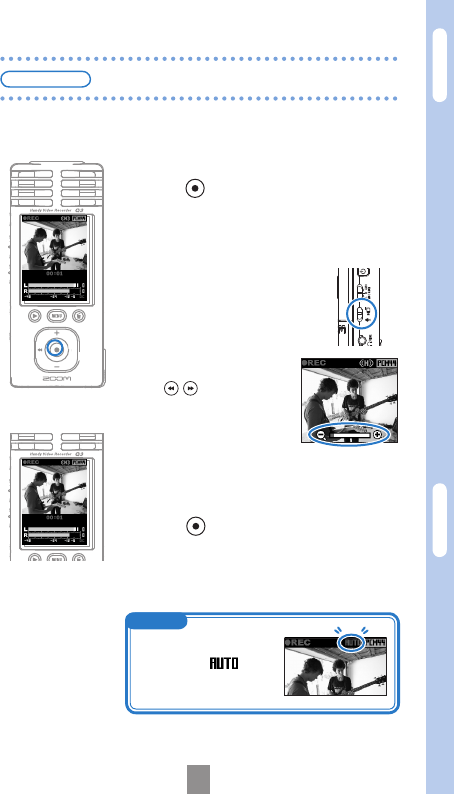
- Record audio and video 5
- Play recordings 6
- Erase recordings 6
- Connect external devices 7
- Part names and functions 8
- • Parts of the unit 9
- • Standard screen 9
- For EU Countries 10
- Upgradingthermwareversion 11
- (on the included SD card) 12
- (DC5V/1A/centerplus) 13
- ZOOM CORPORATION 14
Verwandte Produkte und Handbücher für Mikrofone Samson Q3
 (16 Seiten)


 (72 Seiten)
(19 Seiten)
(56 Seiten)
(25 Seiten)
(28 Seiten)
(84 Seiten)
(1 Seiten)
(45 Seiten)
(9 Seiten)
(10 Seiten)
(16 Seiten)
(16 Seiten)
(2 Seiten)
(8 Seiten)
(2 Seiten)
(4 Seiten)
(72 Seiten)
(19 Seiten)
(56 Seiten)
(25 Seiten)
(28 Seiten)
(84 Seiten)
(1 Seiten)
(45 Seiten)
(9 Seiten)
(10 Seiten)
(16 Seiten)
(16 Seiten)
(2 Seiten)
(8 Seiten)
(2 Seiten)
(4 Seiten)
© 2020, manymanuals.de. Alle Rechte vorbehalten. | 0.036 s |
 Manymanuals.com
 Manymanuals.de
 Manymanuals.fr
 Manymanuals.it
 Manymanuals.pl
 Manymanuals.cz
 Manymanuals.es
 Manymanuals-pt.com
Kommentare zu diesen Handbüchern